Published
- 6 min read
5 warning signs your project is rotting
A few years ago, I worked on a project as the backend .NET lead.
But this isn’t a story about some backend achievement from that time.
Instead, it’s about me watching the frontend team make a big call:
rewrite the entire frontend from Angular to React.
They set an ambitious timeline.
They missed it. Badly.
Was the rewrite the right call? Absolutely. The Angular codebase had reached the stage where every change, every feature, every bugfix was a fight.
But a rewrite being the right call is nothing to celebrate. It means the code had already rotted past the point of repair. And it didn’t get there overnight. It got there with one bad decision at the time.
After being in the .NET industry for 14+ years, I observed that every .NET system goes through 4 phases:
- Greenfield project - a project that has just started.
- Maintenance after shipping v1.0 - fixing bugs and adding new features after the initial release.
- Legacy code - mature codebases that generate a lot of cash for business. Zero tests and a lot of complexity.
- App rewrite - legacy codebases that became unmanageable. And the team has decided to rewrite the from scratch.
Yes, your project is currently in one of those phases.
And no, not every project will ever get to stage 4.
But when they do, the app rewrite takes a lot of time. And the success rate is low.
So the question I hope you are asking right now is:
“If stage 4 is bad, Kristijan, how do I keep my codebase from sliding toward stage 4?”
Well, there is no magic way to prevent this from happening.
But based on my experience, there are warning signs. I’ll cover 5 of them, but there could be more.
And you can split them into 2 buckets:
- Code smells - first 3 signs are code smells. The good news is that you can refactor and fix them. Another piece of good news is that with AI, it is even easier to do that. The bad news? You still have to know what you are doing, and have tests beforehand.
- Decision smells - The other two are decision smells. You can’t refactor your way out of them, because they aren’t in the code. They were a choice someone made back at greenfield phase (phase 1). That may have happened before you even joined the project. Let’s say Bob made the decisions. Bob is not at the company anymore to see what kind of mess he left behind. Bob, if you are reading this, shame on you.
Let’s go through them in that order.
Part 1: Code smells (the ones you can refactor away)
These show up during maintenance. They’re the result of moving fast and duct-taping what’s broken.
1) “God” classes
God classes are classes that have too many responsibilities.
How to recognize? A class has more than 1000 lines of code.
Here is one example of a large class (yes, this is from an actual project).
       public class TeacherHomeController : Controller
{
    public ActionResult Index() { }
    public ActionResult QuizList(int? pageId, int? course_id, int? category_id, string title) { }
    public ActionResult QuizDetail(int? quiz_id) { }
    public ActionResult StudentResultList(int? pageId, int? quiz_id) { }
    public ActionResult EditQuizDetail(quiz FormData) { }
    public ActionResult AddQuiz() { }
    public ActionResult AddQuiz(quiz FormData) { }
    public ActionResult DeleteQuiz(quiz FormData) { }
    public ActionResult StudentResultDetail(int? quiz_id, int? student_id) { }
    public ActionResult AddQuestion(quiz_questions FormData) { }
    public ActionResult EditQuestion(quiz_questions FormData) { }
    public ActionResult DeleteQuestion(quiz_questions FormData) { }
    public ActionResult Courses(int? pageId, string title, int? status, int? course_category_id) { }
    public ActionResult StudentsList(int? pageId, string user_name, string email, int? student_id) { }
    public ActionResult AssignmentList(int? pageId, int? course_id, string title) { }
    public ActionResult DeleteAssignment(assignments FormData) { }
    public ActionResult AddAssignment() { }
    public ActionResult AddAssignment(assignments FormData) { }
    public ActionResult AssignmentDetail(int? assignment_id) { }
    public ActionResult EditAssignmentDetail(assignments FormData) { }
    public ActionResult StudentAssignmentResultList(int? pageId, int? assignment_id) { }
    public ActionResult StudentAssignmentResultDetail(int? assign_answers_id, int? student_id) { }
    public ActionResult GiveAssignmentMarkToStudent(assignment_answers FormData) { }
    public ActionResult StudentListInCourses(int? pageId, int? course_id, string user_name, int? student_id) { }
}
How to eliminate? Make sure to add some tests first (approval tests). Then split it into smaller, focused classes. No architectural decision required.
2) Spaghetti code
Code or project that has very little structure.
How to recognize? A small number of large classes. God classes usually go hand in hand with the spaghetti code.
How to eliminate? Refactor and restructure the project. Group features into feature folders.
3) Copy-paste programming
Same code blocks occur in several places in the codebase.
How to recognize? Usually, when you need to make the same change in 3 different places to fix one bug.
How to eliminate? Refactor the code to eliminate duplication.
TL;DR version of the fix for the above 3 signs:
- Add tests.
- Refactor.
Part 2: Decision smells (the ones you can’t refactor away)
These are not a result of copying and pasting some code.
Instead, they are a result of a decision made. Either at the very start, when someone knew the least about the domain. Or as a result of resume-driven development: beefing up the resume by adding things needed and not needed to the project.
As such, there is no quick refactoring session to fix those.
4) Over-engineering
Using solutions even if you don’t understand them or they are unnecessary.
How to recognize? You are doing it wrong if you have a simple Hello World application that implements 23 design patterns.
Yes, that exists. Here is the repo: https://github.com/code4craft/hello-design-pattern
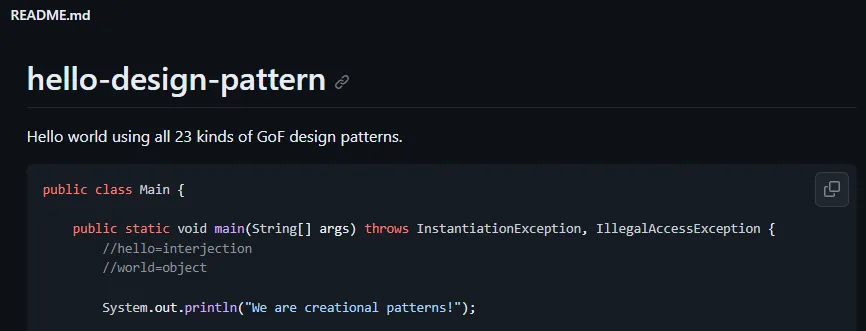
Why can’t you just refactor it out? The complexity isn’t localized to the method or a class, but part of a broader architecture.
How to avoid? By using the most straightforward solution first. And using other solutions when you have a problem that needs to be solved.
5) Golden hammer
Using one solution for all problems. When you have a hammer, and treat everything as a nail.
How to recognize? Using one approach for all projects. Want examples? Using microservices for all projects. Using Clean Architecture in all projects. Using MediatR in all projects. Using Vertical Slice Architecture in all projects.
How to eliminate? If you notice above, I’ve listed some pretty good architectural styles and choices. Every one of them is a good choice from some projects. And a less-than-ideal choice in other projects. There is no silver bullet, a single solution that fits all situations. Therefore, analyze client requirements and use, for example, the Architecture Fit Method to translate them to a technical solution.
The above warning signs are also known as anti-patterns.
The sooner you recognize and correct them, the better the project will be.
Every Friday I reveal insights with frameworks, tools & easy-to-implement strategies you can start using almost overnight.
Join the inner circle of 13,500+ .NET developers